
In some cases, you may not want to keep your Download Monitor subscription active indefinitely. You can disable/cancel your subscription right from your account area or by contacting our team through our contact form.
Click the link below to go to your account area:
To manually cancel your subscription, you need to go to Resources > My account > My Subscription and use the Cancel button:
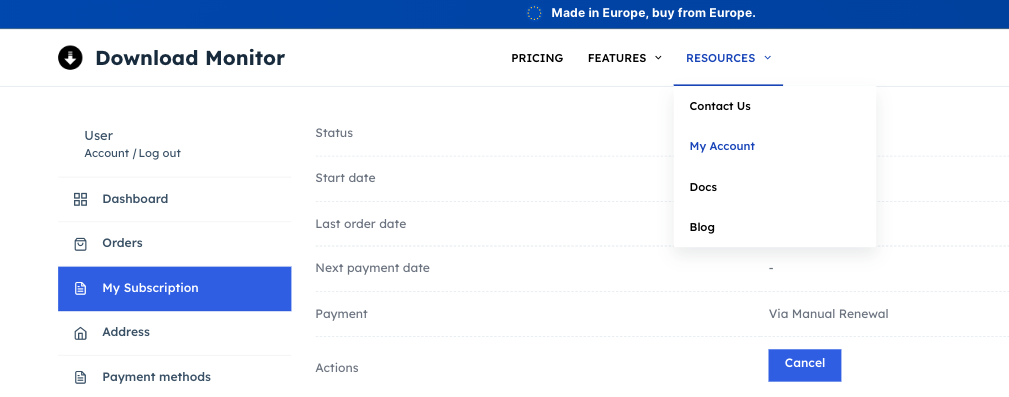
Once canceled, you will not be charged for a renewal next year.
How can the billing info be changed/updated?
At the moment, you cannot change the billing information from your account because we do not store that information – our payment processor handles the payments. The only solution would be to purchase a new license or renew the old one from your account using the new card. The easiest solution would be to cancel the subscription and manually renew when the license key expires. This way, you will be able to enter your new billing information.
How to check your transactions
In order to view your transactions, you need to go to your account here > Orders > Actions > View. You will be able to see your order number and status, the payment method, the date the payment was made, and the amount you paid for our product.